More and more people ask their AI assistant to arrange something for them: a meeting room, a padel court, a guided tour or an appointment. With i-Reserve, that assistant can find you and book with you directly. ARD, the new open standard for AI discoverability, takes care of it, and you don't have to do a thing.
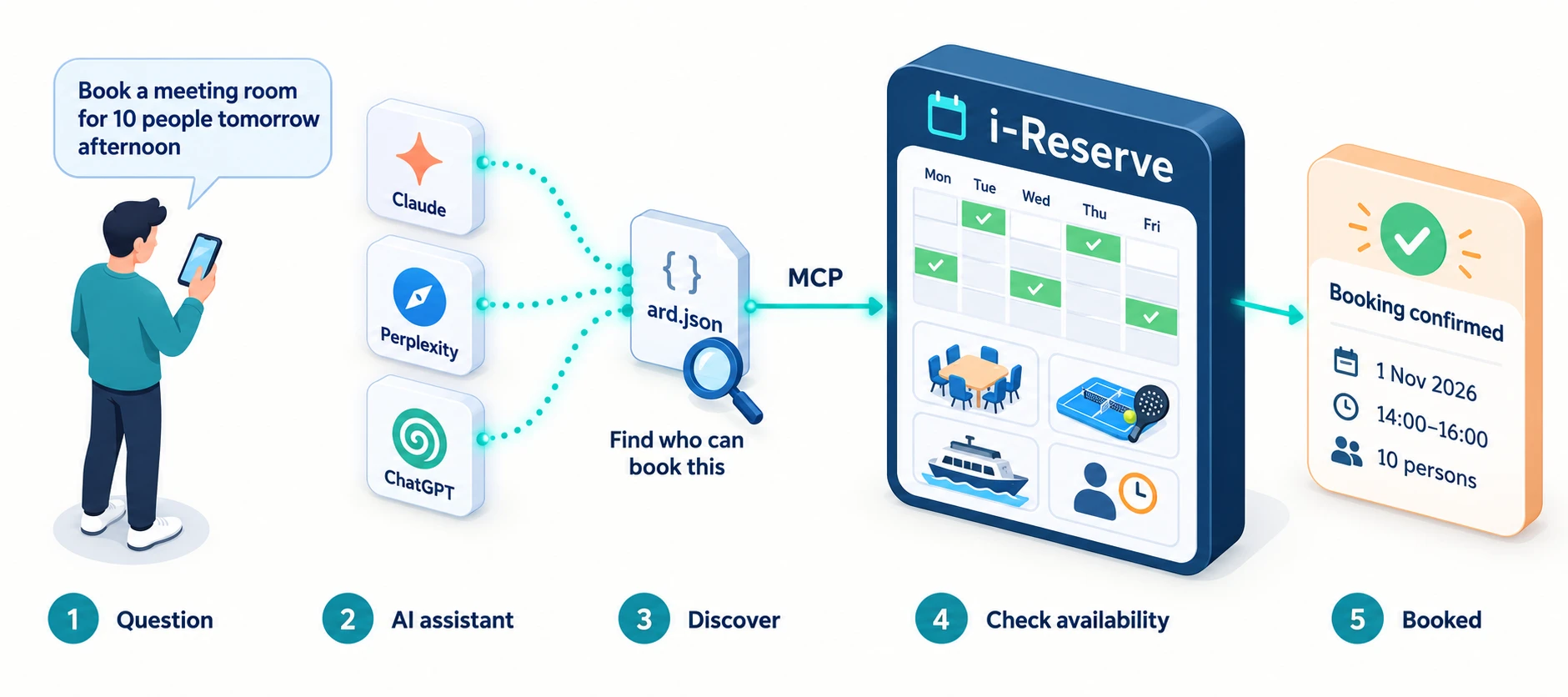
A new way of booking
"Find a meeting room in Utrecht for ten people, tomorrow afternoon." "Is there still room on a canal cruise in Amsterdam on Saturday?" People increasingly ask questions like these of ChatGPT, Claude, Gemini or Copilot instead of a search engine. The assistant works out which providers there are, and more and more often it can also check availability and make a booking itself.
For you as a provider, that raises two questions. Can the assistant find you? And can it then actually book with you? With i-Reserve the answer to both is yes. From version 5.49, every i-Reserve environment can be found and booked by AI assistants.
Try i-Reserve free for 30 days with your own offering. We set it up.
Start your trialWhat is ARD?
ARD stands for Agentic Resource Discovery. It is a new, open standard that lets a website tell AI assistants what they can do there. Think of it as a sitemap for AI. A search engine reads your sitemap to find your pages. An AI assistant reads the ARD file to discover that it can book with you, and how.
i-Reserve publishes that file automatically on your own domain, at the fixed address /.well-known/ard.json. It says who you are, what you offer and which questions you are a match for, such as 'book a meeting room at …' or 'is there still room tomorrow at …'. AI registries read these files and point an assistant to the right provider.
From being found to actually booking
Being found is step one. After that, the assistant has to be able to do something. For that, i-Reserve has a connection through MCP, the Model Context Protocol: the standard AI assistants use to talk to software. Through it, an assistant can do exactly what a visitor to your booking page can:
- see what you offer, such as rooms, courts, activities, tours or appointments;
- check availability and find the first free slots;
- look up your cancellation policy;
- make a booking in the guest's name.
The booking arrives in i-Reserve like any other, with your own prices, terms, confirmations and reminders. There is no middleman and no commission.
Safe, and you stay in control
An AI assistant gets the same options as a visitor to your online booking page, and nothing more. Your admin screens, reports, financial data and settings stay behind your login. Each visitor is limited in the number of requests, and whatever comes in through AI is visible in your AI settings.
You decide whether you take part. In the AI settings, the Agent tab has two switches: AI assistants may book without a key and List this organisation in AI registries. If you switch off only the second one, an assistant that knows your address can still book, but you won't appear in public AI registries.
Honest about where things stand
ARD is a young standard: it was proposed in 2026 and is now being picked up by AI services and registries. So don't see it as a channel that will deliver a stream of bookings tomorrow, but as a head start. When assistants start looking for providers on their own, you are already there. You don't have to do anything, and your website and booking page stay exactly as they are.
How to get the most out of it
- Use your own domain name. In ARD, the domain is the identity. If your booking environment runs on your own domain, you appear in AI registries under your own name.
- Check your company name. That is the name the assistant mentions when it has found you. Without a company name, i-Reserve publishes nothing.
- Write your own example questions. On the Agent tab, enter two to five questions the way your customers ask them, for example 'book a padel court in Breda for tonight'. Leave it empty and i-Reserve writes them for you, based on your name and what you offer.
- Keep your offering and availability up to date. An assistant can only book what can be booked online.
Curious what else AI can do for you, such as an AI agent that answers the chat and the phone? Read our page about AI in i-Reserve or the article How do you use AI to win more bookings? Feel free to get in touch, we're happy to think along with you.