
Booking system for guided tours: bookable even at eleven at night, just like at Grolsch
From brewery tour to city walk. Visitors choose language, location and time, pay online and are on the attendance list. You schedule the guide in a few clicks.
Customers in this sector









Scheduling guides without the puzzle
Assign a guide and see right away who is available. Guides see their own tours in their dashboard. Scheduling staff →In five languages, at multiple locations
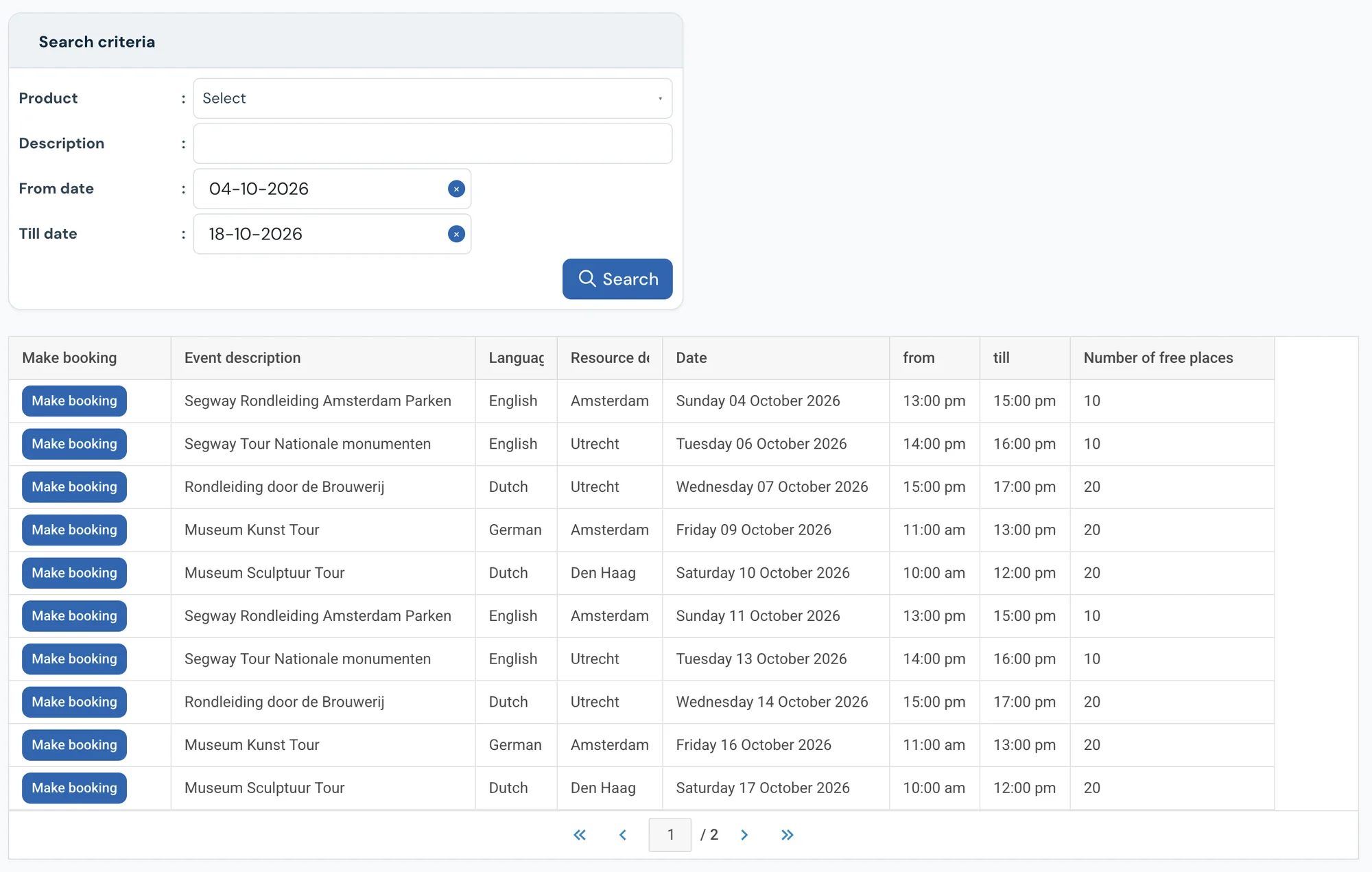
An English tour in Amsterdam and a Dutch one in Utrecht: visitors filter by language, location and date. Search & Book →Attendance list ready before the start
Emailed to the guide automatically, or printed at the desk. You also see which tours are doing well. Attendance list →What it does for you
You manage tours, times, prices and packages from one clear online reservation system. Automate your scheduling and stop keeping track by hand, so you keep time for the experience. With i-Reserve you have instant insight into reservations, customers and payments. You send emails and invoices in your own house style — clear and professional.
Your customers see straight away which tours are available. They book and pay online and manage their booking themselves. You schedule guides in a few clicks, print attendance lists and see at a glance which tours are doing well.
i-Reserve is the reservation system for tours that gives you overview. You focus on the experience, not on the scheduling.
“Thanks to i-Reserve, we are reachable outside opening hours for booking our Brewery Tour.”
What can the reservation system for guided tours do?
A selection of the features. Click for the details.
Schedule
The reservation system gives you a clear view of every guided tour in one schedule, for your customers as well as your staff.
Book online
Through the online reservation system customers can book your guided tours 24 hours a day, on desktop and mobile, and cancel or change their booking themselves.
Search & Book
Let customers search and filter the tours that are available. In the reservation system you can filter by language, location and date, for example.
Scheduling staff
Assign staff to a booked tour in the system with a couple of clicks, and see straight away who is available.
Tasks
Besides managing reservations, the online reservation system lets you create internal tasks for yourself or for colleagues. Add a deadline, a category and, if you like, link the task to a customer or company.
Attendance list
The booking system gives you a clear overview of everyone who has booked. On screen, sent automatically by e-mail, or printed as an attendance list.
Flexible
In the online reservation system you can set up guided tours at different locations and in different languages.
CRM
Besides being a reservation system, i-Reserve is a CRM system too: keep all the details of your customers and companies in one place, with a handy overview of every e-mail sent.
Customer discount
Let the system calculate a standing customer discount automatically when a reservation is made. Besides discounts, you can link a specific group of customers to tours only they can book.
Reports
Pull statistics out of the reservation system using filters. You can have them sent to e-mail addresses automatically, so you know which tours are doing well and how much revenue you are generating.
Pay online
New customers can book a tour and pay for it straight away with the reservation system's payment module.
Waiting list
When a tour is full, customers can put themselves on the waiting list through the booking module and are enrolled automatically as soon as a place comes free.
Frequently asked questions about booking for guided tours
Can I assign a guide to a tour?
You can assign a guide to each tour or activity, and you see at once who is available. Guides can also see their own activities in their own dashboard.
Can I run tours at different locations?
Certainly — a city walk in Amsterdam and one in Utrecht, for example. The location of a tour can be part of the Search & Book function.
Can I set prices flexibly per tour and per time?
Yes, you can set prices flexibly per type, per period, per day or at certain times. You can also work with last-minute discounts, discounts at the moment of booking, or a discount based on the number of participants.
Do I have to set up the system myself?
No. With the trial we set up your environment with your offering, prices and settings, free of charge and within a few days. You can also set it up yourself if you prefer.
Switching from another system, or from a paper diary?
We look at what you have now, move your data across and set up your environment. Also if your current system is about to stop.
Try the demo for guided tours
Book something yourself, add an option and see what the confirmation looks like. No account needed.
Open the demo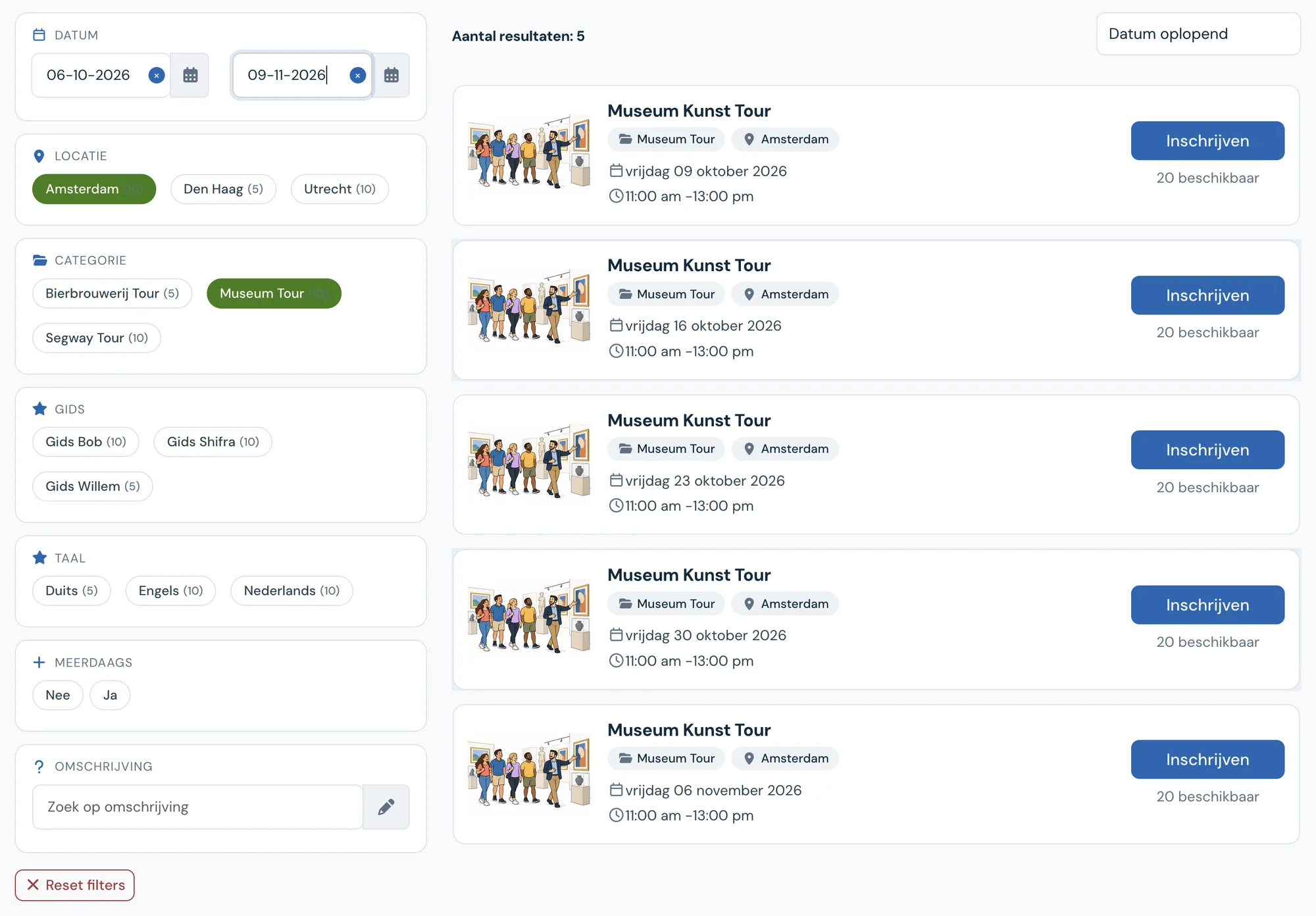
See how it works with your guided tours?
Try it free for 30 days. We set it up for you, within a few days. Or book a 30-minute demo.